Controls Options Panel and Go Live Step (6/7)
Adjust settings for displaying controls and graphics on the broadcast such as the mute indicator and the recording timer. These can be set as part of the Go Live steps or by opening the Controls panel in the Broadcaster later.
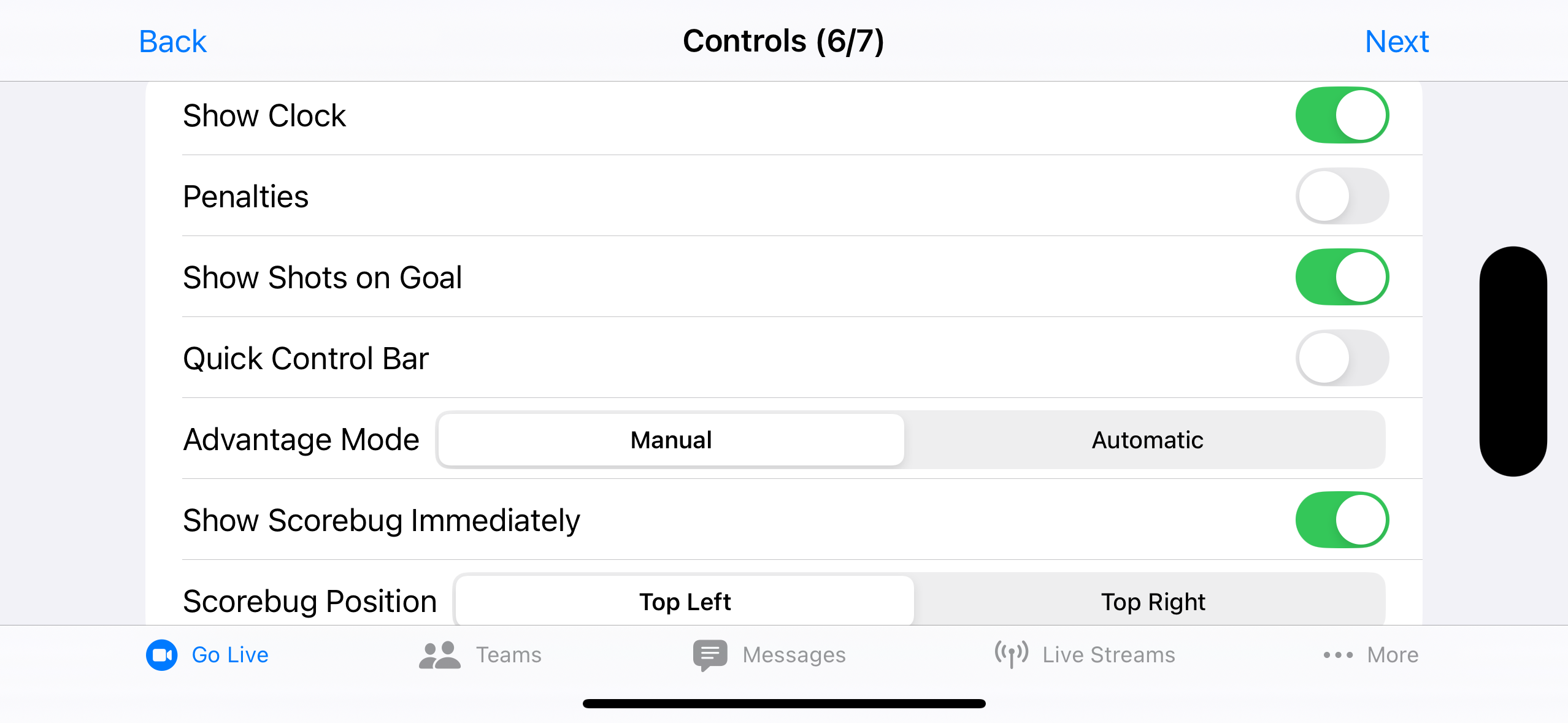
Scorebug
- Show Scorebug shows or hides the scorebug (only in Control Options Panel)
- Show Scorebug Immediately scorebug starts shown (only in Go Live step)
- Scorebug Position scorebug in Top Left or Top Right
Hockey Specific
- Show Clock
- Penalties disabled unless Show Clock is on
- Show Shots on Goal
- Quick Control Bar
-
Advantage Mode (Manual / Automatic) controls the on-ice strength on the scorebug.
Automatic updates on-ice strength when penalties are entered. Manual shows a picker for the on-ice strength.
Soccer Specific
- Quick Control Bar
Replay
- Replay Enabled
- Replay Mode (Basic / Advanced)
- Basic Replay Length length of replay capture for basic mode
- Require Clock Running no replay captured while clock stopped
Learn more about Instant Replay.
Recording Timer
-
Mode (Off / Broadcaster / On Stream)
Broadcaster is visible only on your screen; On Stream is visible on the screen and the stream / recording.
-
Position (Bottom Left / Bottom Right)
Position is disabled when Mode is Off. The position cannot be the same as the Brand position.
Brands
- Brand choose which configured Brand to auto-start with the stream, or None (only in Go Live step)
-
Position (Bottom Left / Bottom Right)
Disabled when no Brand image is configured. The position cannot be the same as the Recording Timer position.
Selecting a Brand queues it to start automatically once you press Play and the stream goes live — it does not appear immediately when you tap Go Live on step 7. Selecting None leaves brand messaging off; you can still start any Brand manually from the Messages Panel during the broadcast.
Learn how to configure a Brand in the Messages Tab.
Muted Overlay
- Size (None / Small / Large)
-
Position (Centered / Top Left / Top Right)
Only positions the Small icon. Position is disabled when Size is None or Large (Large is always centered).